NetRelay IoT LAN Relay Network (Ethernet, WiFi) Smart Relay Development Board
#1014
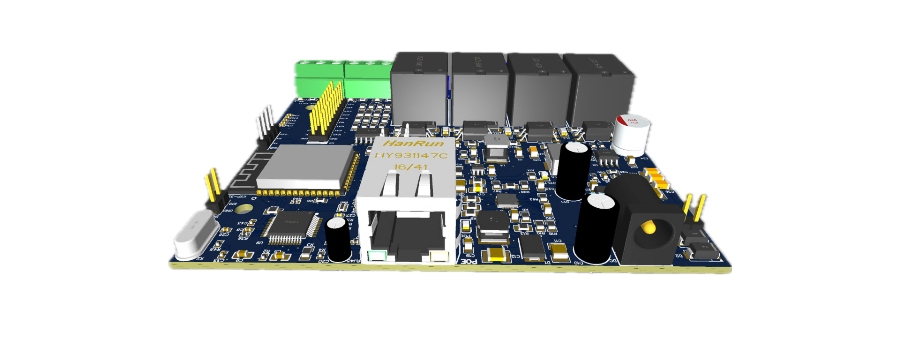
The NetRelay IoT device features 4 digital inputs, 4 built-in 250V 10A relay outputs, and expansion slots with I2C, SPI, + 18 expansion ports. You will add value to your own IoT projects with developer-friendly existing and expandable features such as externally addable RTC and Micro SD ports. With this board, we aimed to provide advanced, stable, and economical solutions that you can use in home and industrial automation systems. With this board, you can send SMS or email based on data from sensors, open and close a contact, and program it weekly. The network-connected LAN Relay Control device supports GET/POST methods and SOCKET SERVER. Through these, you will be able to write programs for the device in Python, NODE JS, Delphi, VB.net, or PHP to control the device's resources or open and close its relays. You will be able to transfer the 1/0 value of digital inputs to a LAN relay board in another location over the network or over the internet.
The Net Relay IoT Development Board is a simple but innovative device that has been missing in network solutions for a long time. On this small circuit board, which is controlled via its built-in Web interface or with projects you will develop yourself, you can take readings by connecting various sensors, and remotely control 4 different outputs with the Relays on it and Lan Relay Controller technology.
To mention the prominent features in the internal software of the Net Relay IoT Development Board; Thanks to the Event configuration feature, you can create scenarios where you can perform different actions when the conditions you specify occur. For example, if a temperature sensor you connect to the device measures below or above the limit you set, you can automatically turn on or off the Air Conditioner connected to the matched output. Thanks to Scheduled Tasks, you can change the status of the outputs on the device according to Sunrise and Sunset or at the time or time intervals you specify. In this way, you can turn on and off the lights of areas that need lighting within certain hours, such as residential complexes, apartments, parking areas, or it can be used in similar areas where access control is required at certain hours. In addition, by pairing two different Net Relay IoT Development Boards over the local network or over the internet, you can perform dry contact transmission between points A and B, or you can program the changes read by the sensors connected at point A to automatically turn on and off the relays of the Net Relay IoT Development Board at point B. With the PING Watchdog feature, which supports up to 4 IP addresses, you can trigger your relays in case the IP addresses you define are offline. Finally, the reporting feature where you can receive the movements occurring in the usage scenarios you apply on the Net Relay IoT Development Board via E-Mail is also provided with the internal web interface on the device.
Thanks to the infrastructure designed for completely flexible use, you can access all resources inside the Net Relay IoT Development Board with all programming languages (Python, Node JS, VB, C#, C++, PHP, ASP, Delphi) and read all connected sensor data. Additionally, you can use the Net Relay IoT Controller like a developer board and load and run your completely custom program inside it.
You can access the CE and ROHS documents of our device below.
Netrelay Iot Development Board Default Login Credentials
IP Address:
192.168.1.50
Username:
admin
Password:
mltek
Sample Applications
MQTT Client Support: NetRelay IoT can easily communicate with an MQTT broker server you will set up yourself or with any cloud-based MQTT server thanks to its MQTT protocol support. The device can read and process commands over MQTT, and trigger relays based on these commands or broadcast system events as feedback via MQTT. This feature provides a powerful integration especially for inter-device communication, central control, remote command execution, and data collection scenarios in IoT applications.
Network Relay Control: The NetRelay IoT device enables remote relay control over the local area network (LAN) or the internet. Users can turn relays on and off, read data from the device, or monitor digital inputs via GET/POST HTTP requests or Socket Server. Thanks to this feature, systems located in points that are not physically accessible can be easily controlled. Real-time switching operations can be performed via the web interface, mobile application, or custom software. Thanks to its network-based control structure, it offers a structure that is much more flexible, remotely manageable, and integrable into automation compared to classic relay solutions.
Time & Attendance Systems and Access Control: NetRelay IoT offers an effective solution for turnstile or barrier control in Time & Attendance systems. While turnstiles or barriers can be opened and closed remotely with relay outputs, feedback such as the open/closed status or passage information of this hardware can be received via digital inputs. In this way, the system can verify the status of the physical hardware and create secure and controlled access scenarios.
Production Tracking, Counter, and Quality Control Applications Production quantities can be monitored instantly via sensors connected to conveyor systems in factories. Pulse signals received over digital inputs are processed into counters, allowing real-time tracking of production speed, downtime, and malfunction information. Furthermore, for software developers, the system can be customized to support analog inputs. Thus, analog data such as temperature, humidity, and pressure can also be monitored, and relay triggers can be made depending on these values. Consequently, not only counter tracking but also production quality and environmental conditions are monitored integrally.
Well and Water Tank Control: A float switch located in one location detects the water level and generates a digital 1/0 (dry contact) signal. This signal is transmitted over the network (e.g., via internet connection or long-distance wired communication, outdoor Access Point (AP) devices) to the pump/motor control system in another location. With the relay output, the motor activates or stops. In this way, remote automatic water level management is provided.
Alarm Systems: With the central alarm control system, digital signal (dry contact) communication can be provided between indoor or outdoor alarm units over the network (via internet, LAN, or wireless outdoor AP). In case of any alarm trigger, information is instantly transferred to the alarm unit thanks to the relay output. This structure offers the possibility of remote and instant intervention for situations such as fire, theft, or environmental sensors.
Sample Park & Garden Project: Automatically start irrigation when the moisture level drops with the soil moisture sensor, or run it every two days at 20:00 and turn it off after 30 minutes.
Lighting Savings System:Significant time and money can be saved by turning on the lights in municipalities, complexes, apartments, parks, and gardens 20 minutes after sunset and turning them off 30 minutes before sunrise.
Sample Greenhouse Project: Automatically close the greenhouse if the wind speed exceeds 20 KM per hour (if there is an electrical closing system in the greenhouse).
License Plate Recognition System: If the license plate detected by the license plate recognition system is authorized, send an opening trigger to the barrier for 1 second (optional).
Computer Server Cabinet Systems: If the in-cabinet temperature rises above a certain value, operate the cooling fan; with the Ping watchdog function, an alarm or light relay can be triggered when the internet connection is lost. SMS or E-mail can be Sent.
Production Tracking, Counting, and Monitoring: By reading the barcodes on the products from a standard barcode reader with a serial port, it can instantly send the number of produced products to the Server with the built-in SOCKET client on the NetRelay IOT board.
LOGGING: Logs can be kept with the MicroSD Card module.
Treatment System Operation Tracking:With a current meter to be installed only on the treatment system, it can send the instantaneous current drawn to a remote server. When the current drawing stops or falls below a certain value
Event-dependent E-Mail or SMS sending. Internet Connection Control: It checks the internet connection, pulls a relay when the connection is lost, the contact returns to its original state when the connection comes back, mechanically activates the backup line, the main line steps in when the connection arrives, or a siren can be sounded or a light can be turned on when the internet connection is lost.
Apartment Complex Lightings:
Turning the Apartment Complex lighting on and off according to sunrise and sunset. It automatically calculates sunrise and sunset according to the entered coordinates and provides great savings and comfort by turning the complex lights on and off without the need for any sensor.
Fully Compatible with Home Assistant
NetRelay works flawlessly with Home Assistant, the world's most popular open-source home automation platform. It provides 100% Local Control without sending your data to Cloud systems.
✅ ESPHome Native API Support: You can introduce your device to Home Assistant in seconds directly with ESPHome integration, without dealing with MQTT settings.
✅ Plug-and-Play YAML Configuration: Instantly activate your relays, inputs, and sensors without the hassle of writing code by using the ready-made .yaml file prepared for NetRelay.
✅ Zero Latency: Thanks to the Ethernet connection and local API, you get a response the moment you press the button. Forget about the 2-3 second delays in cloud-based relays.
API EXAMPLE-1
When a request is made to http://192.168.1.50/ios with the GET method, it gives the sensor data and the status information of the I/Os as JSON.
http://192.168.1.50/outk?out=1&durum=1&gecikme=2 makes the status of out1 1, 2 seconds later the contact returns to its original position if the delay is 0 (zero), the contact remains in that position and gives feedback on the status information of the I/Os as JSON.
Connecting as a Web socket client and controlling relays:
From the "Remote Control" menu, the device is selected as "Remote Mode" Server and saved, default port 3000
Connection is established in any language with ws://192.168.1.50:3000 client request.
Outputs : out1,out2,out3,out4
If the JSON string {"nereye": "outRemote1", "out": "out1", "durum":"1"} is transmitted as a message, out1 status is made 1 out1 becomes active.
If the JSON string {"nereye": "outRemote1", "out": "out1", "durum":"0"} is transmitted as a message, out1 status is made 0 out1 becomes passive.
API EXAMPLE-4
Installing a TCP Socket Server on the computer and connecting with the IOT Device client
For this, you need to check "General Settings" "Device ID" 1001, "Socket Server" the IP address of your computer where you installed the Socket Server, "Websocket Port" the port number of the web socket and the "Connect Socketserver" option.
When you send the above json to the NetReley device via web socket, it makes the out1 of the device 1 until another command arrives, when you make the delay not 0 but 10, it brings the contact to position 1, 10 sec (optional you can give any + integer value you want as sec) later it reverses it, meaning it makes the contact status 0. So you can give the contact as much delay as you want.
At the same time, the IOT device will send the following data to the socket server on the computer every 300 ms



Comments